Hundreds of SLA Rules, One Jira: Keeping Multi-Service Agreements Manageable
How MSPs and enterprise ITSM teams keep multiple SLA agreements in Jira manageable with shared rules, documented exceptions, aligned calendars, and per-client reporting.
A multi-client service desk begins with a clean SLA setup; the twelfth client then enters into a contract with a 30-minute response time rather than a 60-minute one. The customer in the financial services sector requires a separate holiday calendar, and the telecom account wants P1 incidents to be tracked around the clock, whereas all the other cases are handled during business hours.
All requests are reasonable since each one is generally a copy of an existing SLA with just one condition modified; two years on, the Jira administrator is faced with hundreds of SLA rules and no one can be certain about which rule applies to which ticket.
What we have here is SLA sprawl; it doesn’t usually cause tracking to break directly but does undermine something more difficult to detect – your capacity to modify, check, and have confidence in the figures. For managed service providers, telecom and financial services providers, and enterprise ITSM teams, managing SLAs on a large scale is not primarily a matter of creating more rules but rather about determining which rules should in fact exist.
A practical method of organising several SLA agreements in Jira is to start with the shared rules, then deal with the exceptions, place the calendars on their own level, and finally handle reporting at the level at which the commitments are actually made.
Why multiple SLA agreements in Jira multiply
Nobody designs an SLA setup with 300 rules. It grows out of three habits.
One full SLA set per contract. Each new client gets its own time to first response and time to resolution for four priorities. That is eight configurations per client before any special terms. At 40 clients, you are past 300.
Copy-and-tweak exceptions. A client needs a different pause rule for „Waiting for vendor”. Instead of extending a shared rule, someone duplicates it. Now two nearly identical rules exist, and they quietly drift apart.
Schedules buried inside rules. When working hours and holidays live inside each SLA instead of being reused, one public holiday change means editing dozens of configurations by hand.
Per-client sets grow by eight with every new contract. A tiered model grows only by the exceptions that are truly different.
The cost shows up later, in three places:
- Changes slow down, because nobody knows which rules depend on each other.
- Metrics stop being comparable. „Time to first response” may start at creation for one client and at triage for another.
- Disputes get harder. When a client questions a breach, the team first has to work out which rule was in force.
A multi-client SLA model: separate what is shared from what is specific
The fix is not fewer clients or simpler contracts. It is a model where each kind of decision lives in exactly one place. Four layers cover most multi-client setups, whatever your SLA tool calls them (goals, behaviors, agreements, SLA configurations).
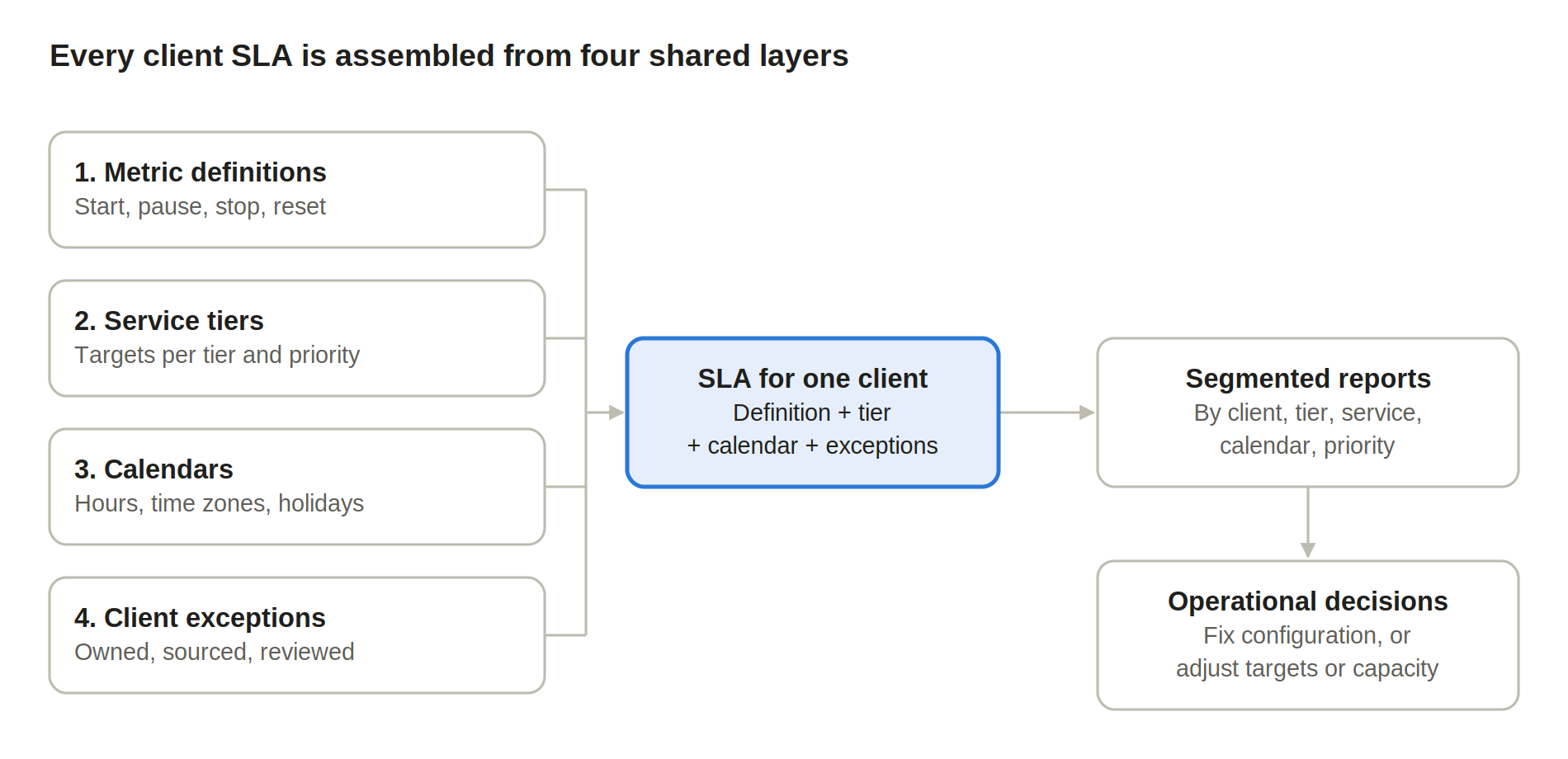
Each layer is maintained once and reused. A client’s SLA is the combination, not a separate build.
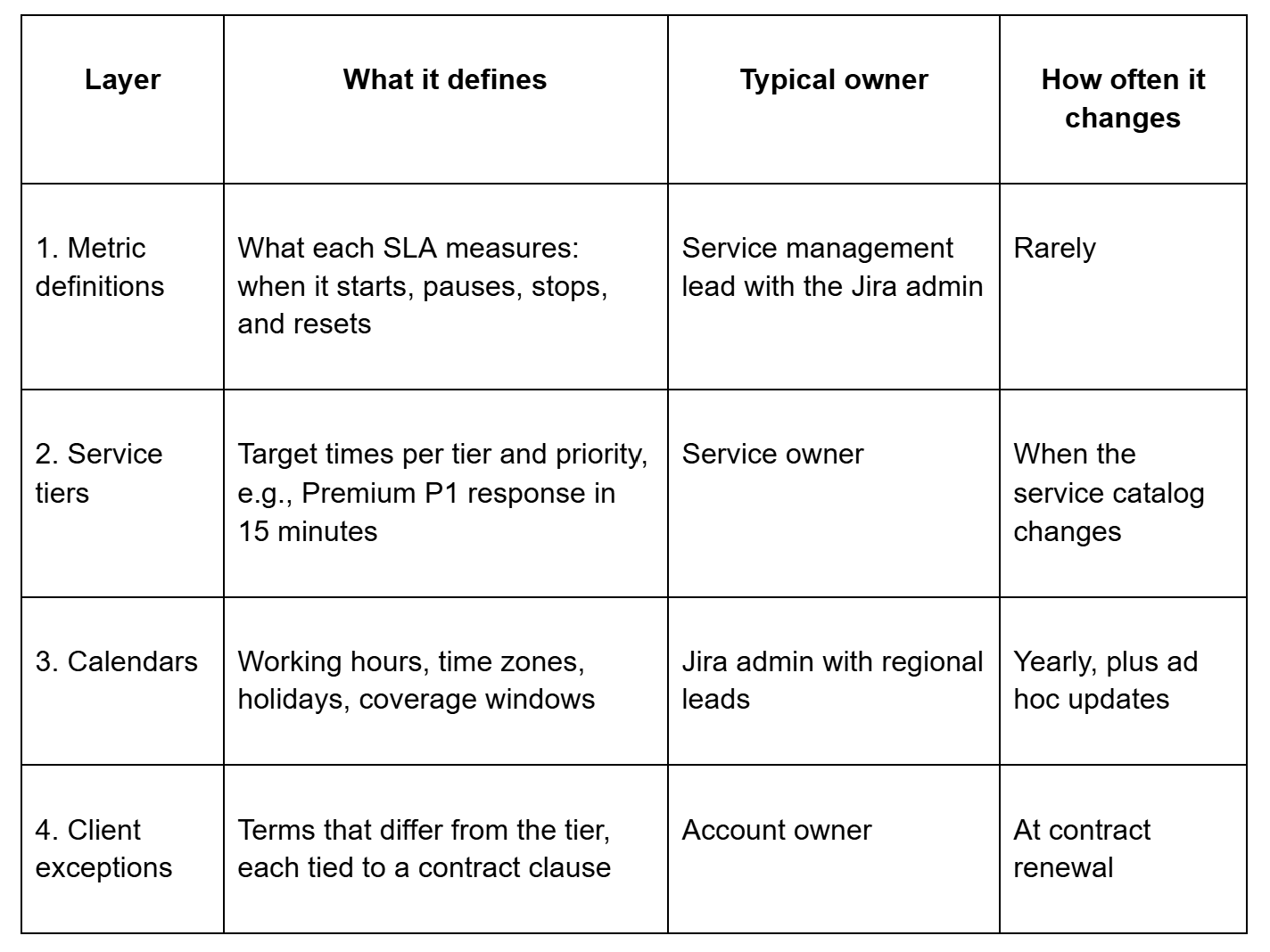
[Example structure. Targets and owners are illustrative]
The test for this model is simple: a new client should be configured by choosing, not by building. Pick a tier, pick a calendar, record the exceptions. If onboarding a client means writing new start or stop logic, layer 1 is missing a definition.
In SLA Time and Report for Jira, layer 1 maps naturally to a Multiple-Projects SLA. One configuration, with one set of start, pause, stop, and reset conditions, can cover several projects instead of being copied into each of them.
Treat exceptions as exceptions
Exceptions are where sprawl starts, so they need stricter rules than the shared layers. Four habits keep them under control:
- Every exception has an owner and a source. Link it to the contract clause or request that created it. An exception nobody can trace is a candidate for removal.
- Exceptions override, they don’t copy. Change only the value that differs, such as one target or one pause status. A full duplicate of a shared SLA hides which part is actually special.
- Repeated exceptions become a tier. If three or more clients share the same deviation, it is no longer an exception. Promote it to layer 2 and retire the copies.
- Exceptions get a review date. Contracts get renegotiated. Rules written for a 2023 deal often outlive the terms that justified them.
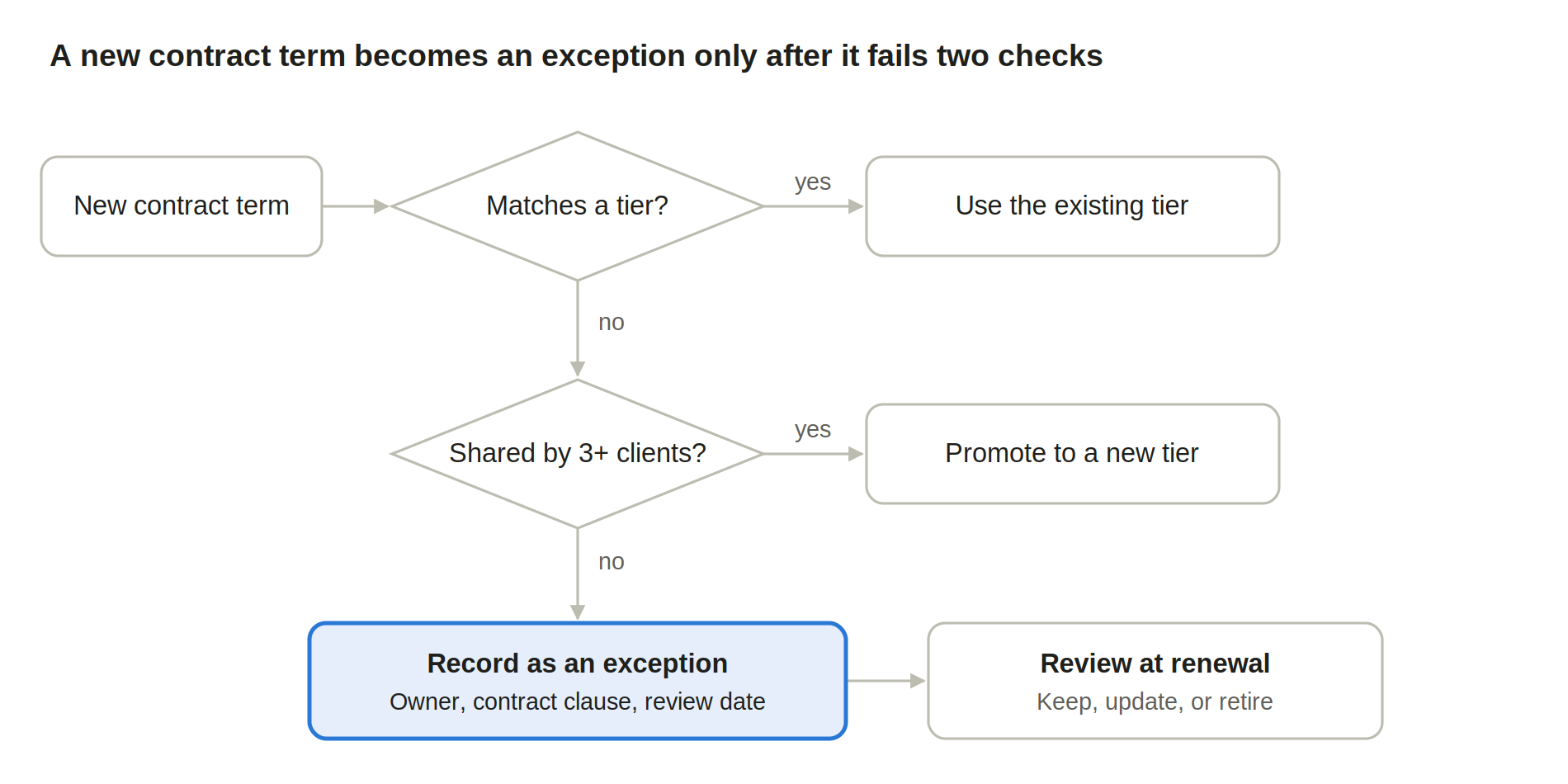
Most new terms stop at the first or second check. Only what is truly unique to one client reaches the exception layer.
A useful sanity check: could you explain this rule to the client in a quarterly business review? If not, it probably reflects a workaround, not a commitment.
Before creating a separate SLA for a client, check whether the difference fits into a condition. In the SLA configurations – start, pause, stop, and reset conditions can combine several criteria with AND/OR logic, including field-driven triggers. That gives you more room to keep one definition and describe the difference inside it.
Align Jira SLA calendars before you multiply goals
Many „special” SLAs are not special targets at all. They are the same target counted against a different schedule. Separating calendars from rules removes a large share of duplicates.
Start by separating two things that often get mixed up:
- Team calendars describe when your people work: shifts, regional offices, on-call rotations.
- Client commitments describe when the clock should run for that client: their business hours, their time zone, their public holidays.
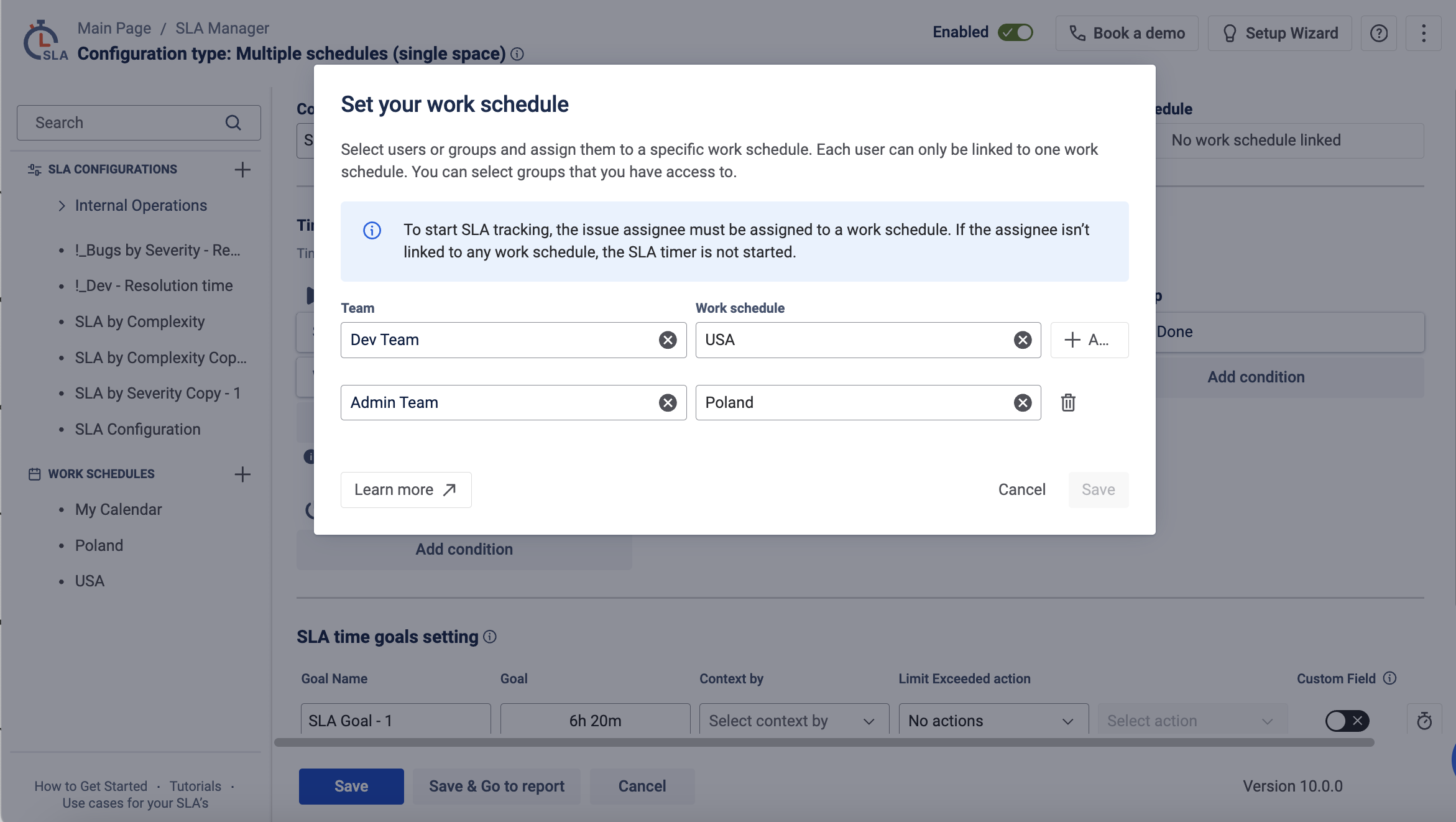
The SLA clock follows the commitment. Team calendars matter for staffing and routing, but a client in Warsaw does not lose SLA time because your Manila team is off shift.
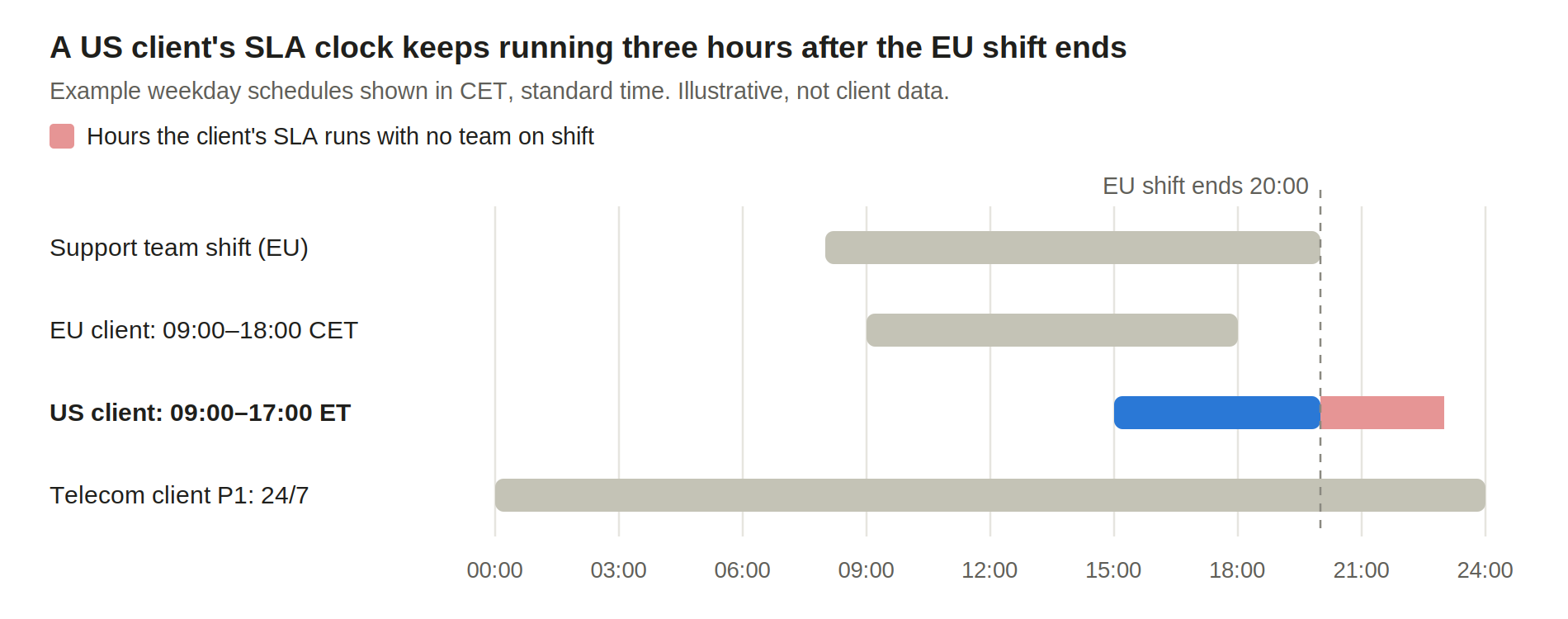
The US client’s contract is met or missed in the evening hours, when the team calendar shows nobody working. That gap belongs in staffing or routing decisions, not in a changed SLA rule.
Then build a small, named calendar library and reuse it:
- Name calendars by coverage, not by client: „CET business hours, PL holidays”, „24/7”, „US Eastern business hours”.
- Maintain holidays once per region, not once per SLA.
- Keep the calendar out of the SLA name. „P1 Response | Premium” ages better than „P1 Response | Acme | CET”.
Before rollout, test each calendar on a few real scenarios: a ticket created at 17:55 on a Friday, one raised on a local holiday, and one handed between regions.
In SLA Time and Report, SLA time is calculated by configured work schedules, each with its own time zone and holidays. For follow-the-sun teams, a Multiple-scheduler setup calculates time by the schedule of the active assignee. Use it deliberately: it fits commitments that follow your team’s coverage, while a contract tied to the client’s business hours should follow the client’s schedule.
Enterprise SLA management needs reports at the level of the promise
A consistent model pays off in reporting. When „time to first response” means the same thing for every client, results become comparable across clients and against each tier.
A single compliance figure for the whole desk can look healthy while one account breaches every week. Segment results where commitments are made:
- By client or organization: is each contract being met?
- By tier and priority: are Premium targets realistic for current staffing?
- By service or request type: where does the process slow down?
- By calendar or region: do breaches cluster around handovers and holidays?
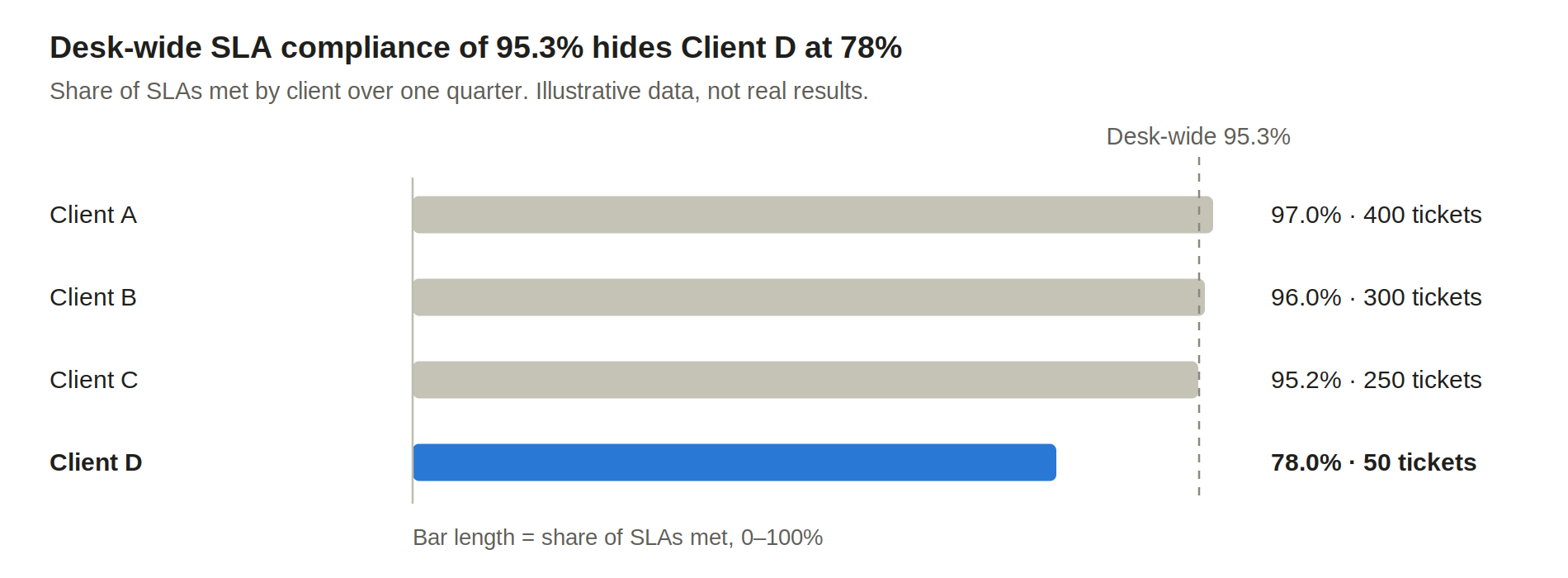
Because Client D sends only 5% of the volume, its result barely moves the desk-wide figure. Only a per-client view shows that one contract is failing.
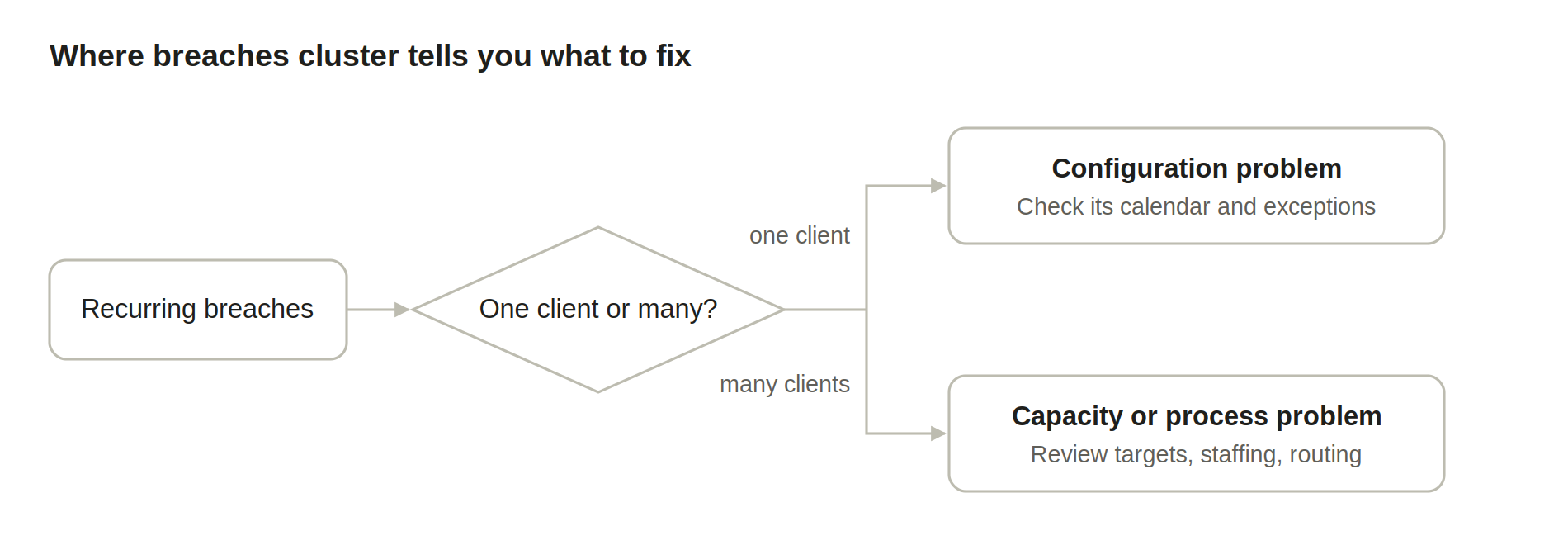
The pattern tells you what to fix. Breaches concentrated in one client with a unique schedule usually point to configuration. Breaches spread across every client in a tier point to targets or capacity.
In SLA Time and Report, this segmentation is the job of the Met vs Exceeded per Criteria report: it breaks SLA results down by assignee, priority, request type, or custom fields. This helps managers see where breaches are concentrated instead of treating all tickets as one number.
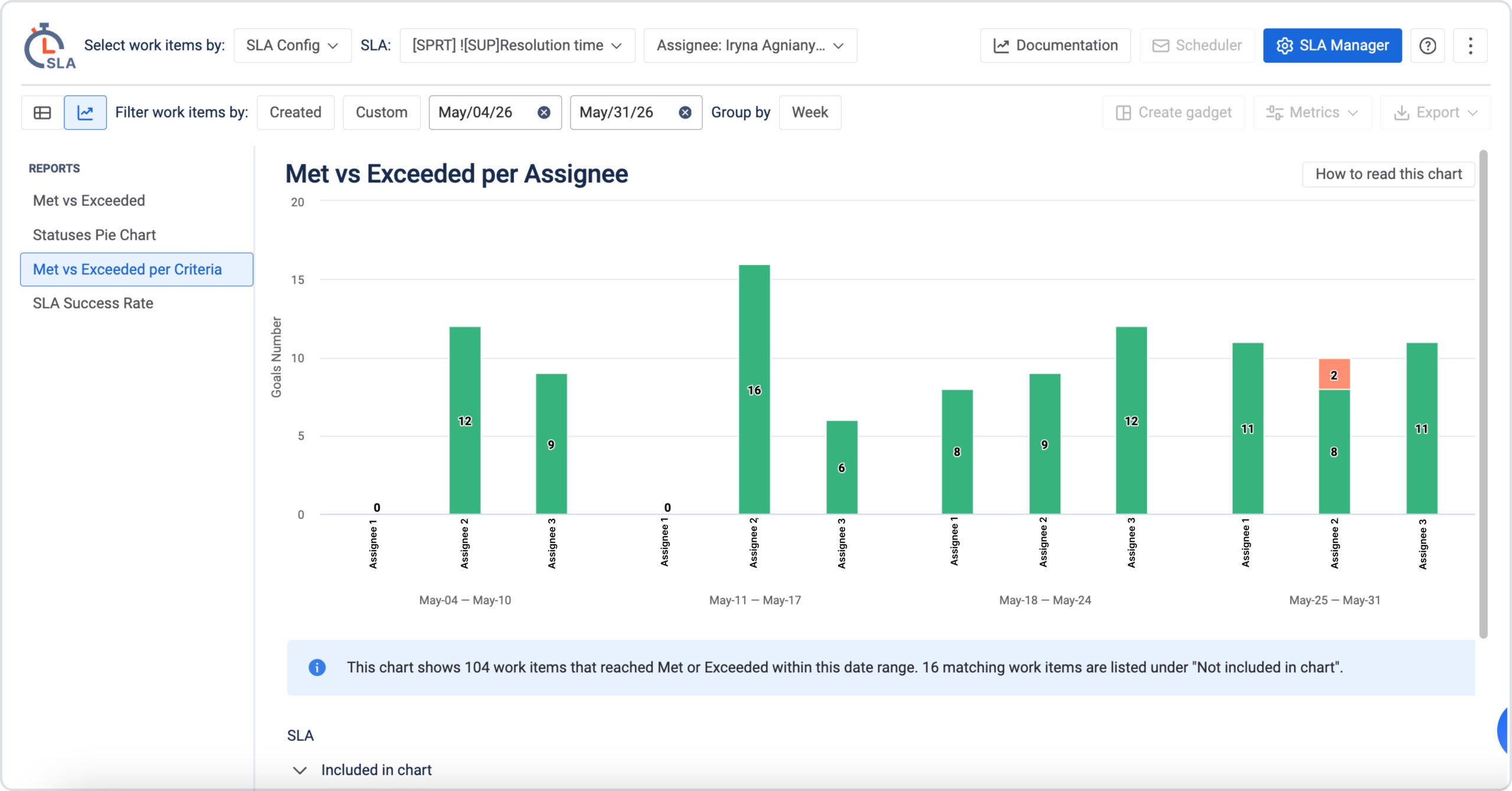
Met vs Exceeded shows how many goals were met or exceeded during the selected period, making it easier to review overall performance and compare results over time.
SLA Success Rate summarizes the share of goals met, while SLA Status Pie gives a quick view of how tracked SLAs are distributed by status. Together, these reports help teams understand both the overall result and where to investigate further.
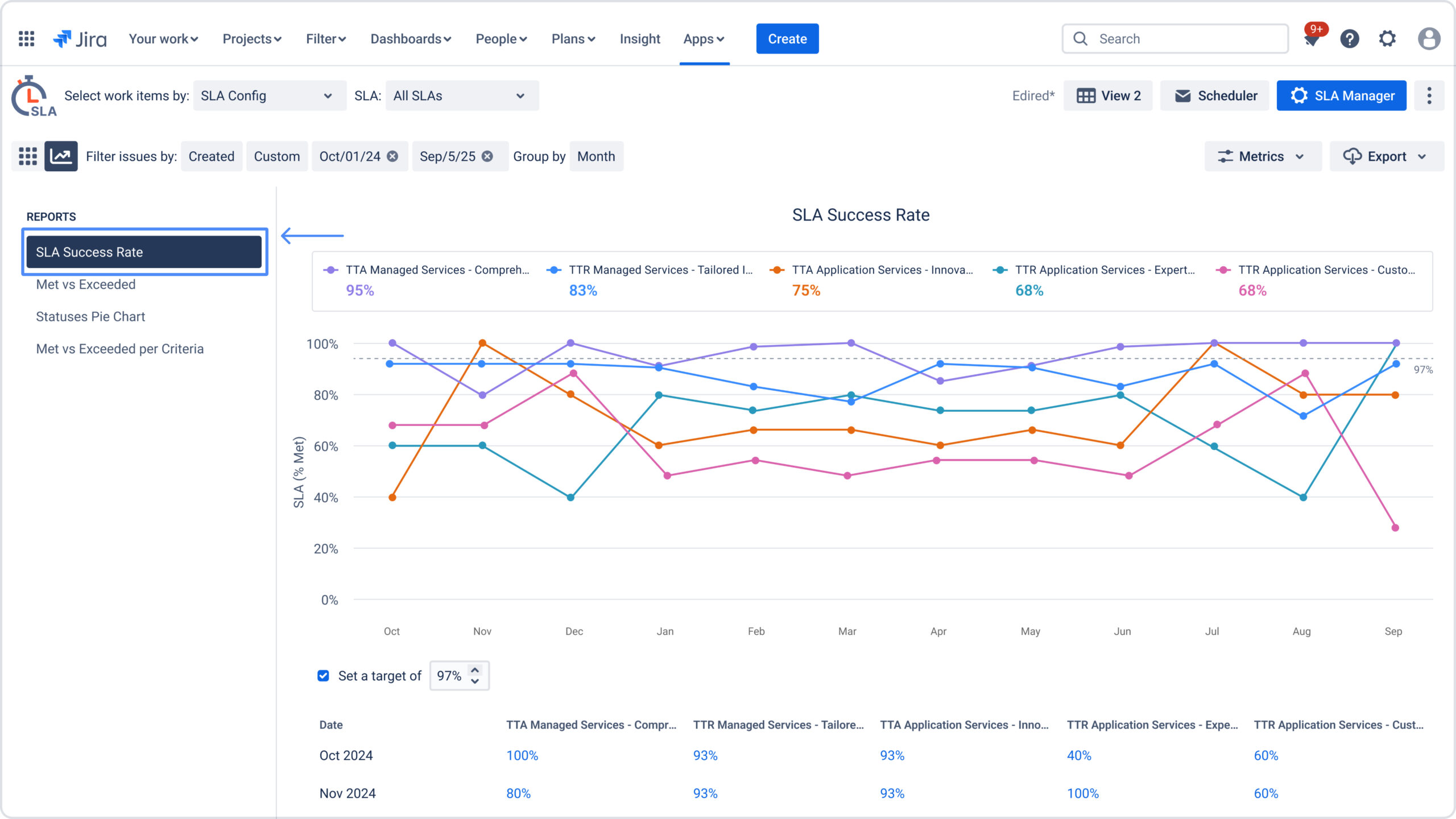
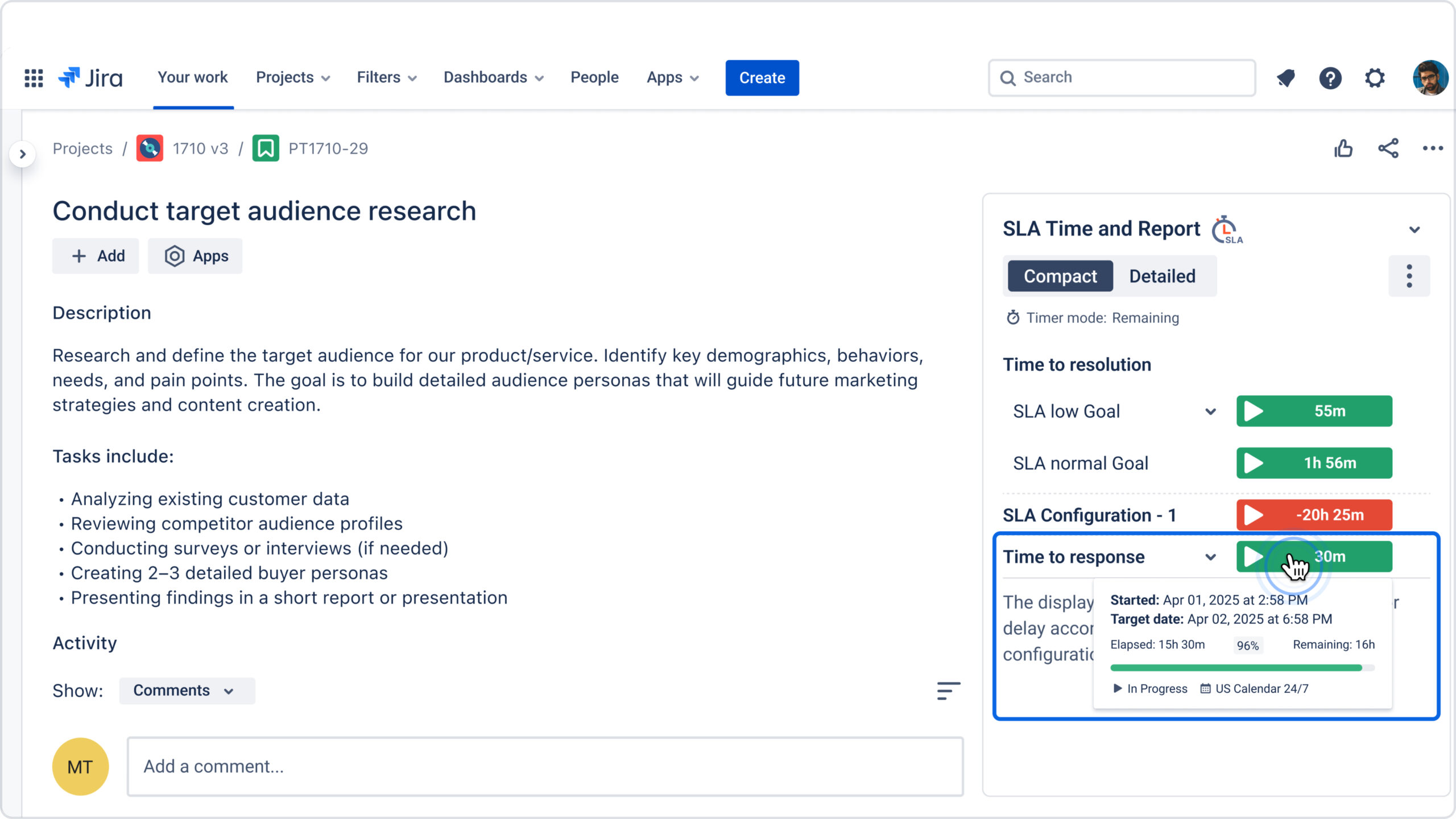
Saved report views keep the same per-client filters ready for each review. With Report Scheduler, Jira users can receive an email with a link to a report on a regular schedule, so managers don’t have to prepare every update manually. And while reports help managers review performance, the SLA widget on each ticket lets agents check that work item’s SLA status as they handle it.
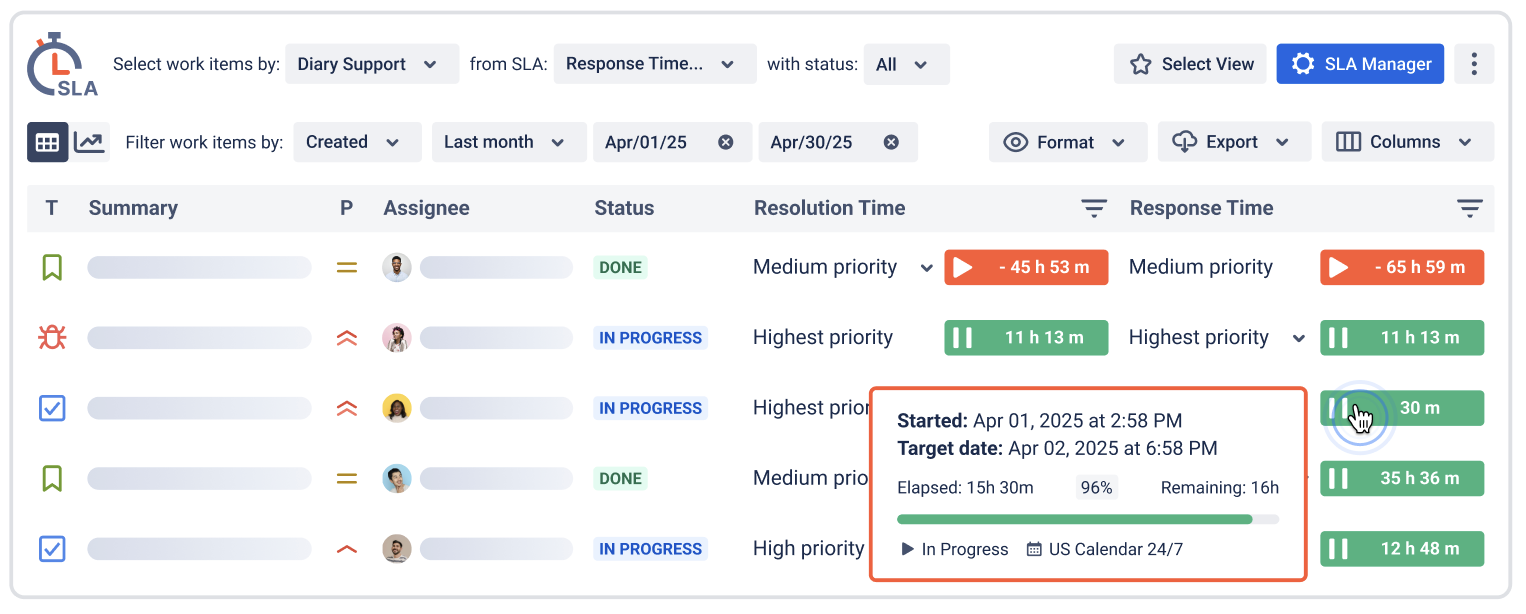
The SLA Grid shows each work item’s SLA status and how much time has elapsed or remains. Managers can scan the table to spot tickets that need attention and see where the team may be at risk of missing a target.
How to set up SLAs for a new client
A new client does not always need a new SLA setup. First, check whether their agreement matches rules you already use. If it does, you can apply the existing setup. If it differs, configure the SLA to reflect those specific terms.
- Review the agreement. Note the response and resolution targets, working hours, time zone, holidays, and situations when the SLA clock should pause or stop.
- Choose the right SLA rules. Check whether an existing setup matches the agreement. If the targets, calendar, or conditions differ, configure rules that apply to this client’s tickets.
- Make the client easy to identify in Jira. Use a field such as Organization, project, or a custom client field. This helps apply the right SLA logic and review results for that client later.
- Test the setup. Use a few past or sample tickets to check when the SLA starts, pauses, and stops, and whether the correct target and calendar apply.
- Make the results visible. Agents can check SLA progress on the ticket. Managers can use reports to review performance by client. For example, Met vs Exceeded per Criteria can break results down by a field such as Organization, helping managers see whether a particular client’s targets are being met.
Review the setup regularly. Check that each SLA still matches the client agreement, calendars include the right holidays, and exceptions are still necessary. If the same exception keeps appearing, consider whether it should become a standard rule for that service.
Fewer rules, clearer promises
Hundreds of clients do not require hundreds of independent SLAs. They require a small set of shared definitions, a few well-defined tiers, a reusable calendar library, and exceptions that stay visible and owned.
Get that structure right, and adding a client becomes a configuration choice instead of a new build. Reports then show what matters most to a multi-client service desk: whether each promise, to each client, is being kept.
Udostępnij artykuł